
Facebook wants to categorize your business page and, as with most things on Facebook, it isn’t intuitive what you should select.
You Are an Artist
In 3 short steps, you’ll find the Artist category.
Step 1: Select Edit Info under the photo strip on your page.

Step 2: Select “People” from the drop-down menu.
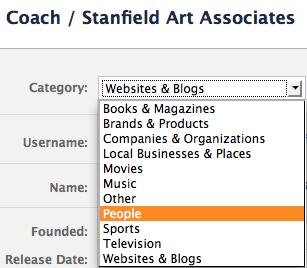
Step 3: Select “Artist” from the drop-down menu on the right.

Voila! You’re an artist again!

4 thoughts on “You ARE an Artist – Even on Facebook”
Thanks so much! I truly hated being an organization!
Great information. However, I guess I don’t have a “business page” that you mentioned and can’t make the edits you suggested. Where did I miss out on that?
Pingback: How (and Why) to Tag People on Facebook — Art Biz Blog
I received my copy of I’d Rather Be in the Studio, and have learned so many tips to help me promote my business.I also signed up for the blog class – excellent.
In this post, I went to my “edit info” , and it does not have the drop down menu.
Comments are closed.